Libraesva offre un'opzione per configurare un Anti-Spam Rule Filter che invia le email di Spam direttamente nella cartella (Junk) degli utenti invece di metterle in quarantena su ESG.
Se preferisci avere le email di spam nella cartella posta indesiderata degli utenti invece che in ESG, segui i passaggi seguenti.
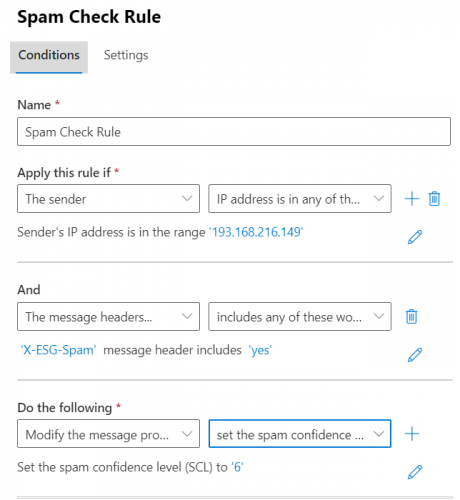
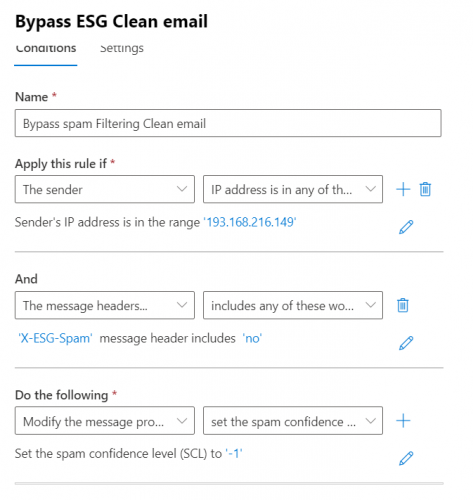
- Vai alle regole spam nell'Exchange admin center (microsoft.com) di M365 e crea due regole, una per (Spam Check Rule) e l'altra per (Bypass rule)
- Spam Check Rule: crea una regola come segue:
- Rule Name
- Imposta Apply this rule if: Sender->IP address is in any of these ranges or exactly matches-> aggiungi l'IP della tua appliance ESG
- Clicca sul segno più (+) in Apply this rule if
- In And seleziona The message headers-> includes any of these words
- Digita X-ESG-Spam in (specify header name) e aggiungi yes in (specify words or phrases)
- In Do the following: seleziona Modify the message properties e seleziona set the spam confidence level(SCL)
- Imposta lo spam confidence level a 6
- Salva
- Crea un'altra regola
- Name: Bypass spam Filtering Clean email
- Imposta Apply this rule if: Sender->IP address is in any of these ranges or exactly matches-> aggiungi l'IP della tua appliance ESG
- Clicca sul segno più (+) in Apply this rule if
- In And seleziona The message headers-> includes any of these words
- Digita X-ESG-Spam in (specify header name) e aggiungi no in (specify words or phrases)
- In Do the following: seleziona Modify the message properties e seleziona set the spam confidence level(SCL)
- Seleziona (Bypass spam Filtering)
- Salva
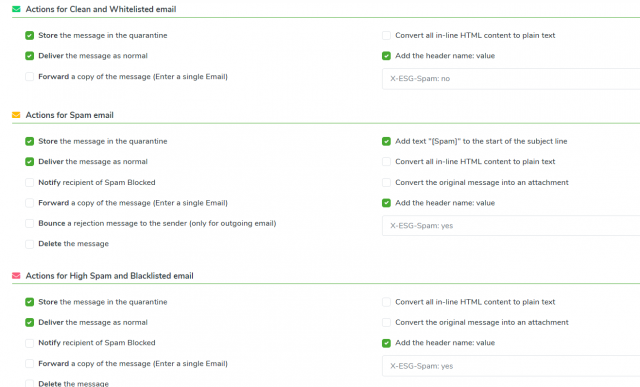
- Vai quindi nella tua appliance ESG, in Admin area->Content Analysis->Anti-Spam Settings e vai su (Antispam Action Settings).
- In (Actions for Spam email) seleziona “Store the message in the quarantine” se vuoi avere una copia delle email in ESG e seleziona “Deliver the message as normal”: questo forzerà ESG a inviare le email di spam al tuo office 365.
- Aggiungi questo header in (Actions for clean and whitelisted email) X-ESG-Spam: no
- In (Actions for spam email) e Actions for High Spam and Blacklisted email) aggiungi questo header X-ESG-Spam: yes