Libraesva ofrece la opción de configurar un Filtro de Reglas Anti-Spam que enviará los correos de Spam directamente desde la carpeta (Junk) de los usuarios en lugar de ponerlos en cuarentena en ESG.
Si prefiere tener los correos de spam en la carpeta de correo no deseado de los usuarios en lugar de en ESG, siga los siguientes pasos.
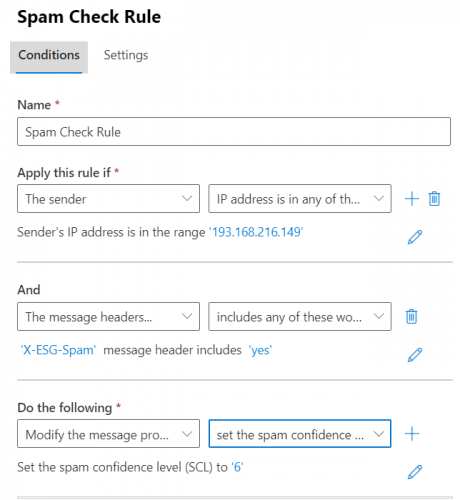
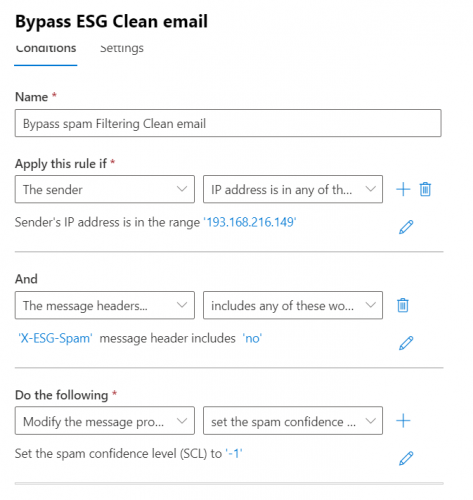
- Vaya a las reglas de spam en el Exchange admin center (microsoft.com) de M365 y cree dos reglas, una para (Spam Check Rule) y otra para (Bypass rule)
- Spam Check Rule: Cree una regla de la siguiente manera:
- Rule Name
- Establezca Apply this rule if: The Sender->IP address is in any of these ranges or exactly matches-> añada la IP de su appliance ESG
- Haga clic en el signo más (+) en Apply this rule if
- En And seleccione The message headers-> includes any of these words
- Escriba X-ESG-Spam en (specify header name) y añada yes en (specify words or phrases)
- En Do the following: seleccione Modify the message properties y seleccione set the spam confidence level(SCL)
- Establezca el spam confidence level en 6
- Guárdelo
- Cree otra regla
- Name: Bypass spam Filtering Clean email
- Establezca Apply this rule if: The Sender->IP address is in any of these ranges or exactly matches-> añada la IP de su appliance ESG
- Haga clic en el signo más (+) en Apply this rule if
- En And seleccione The message headers-> includes any of these words
- Escriba X-ESG-Spam en (specify header name) y añada no en (specify words or phrases)
- En Do the following: seleccione Modify the message properties y seleccione set the spam confidence level(SCL)
- Seleccione (Bypass spam Filtering)
- Guárdelo
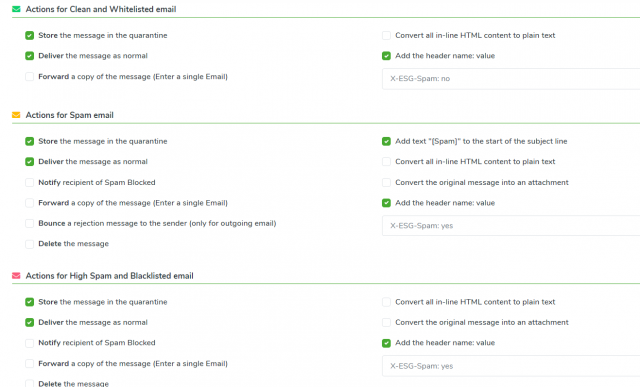
- A continuación, vaya a su appliance ESG Admin area->Content Analysis->Anti-Spam Settings y vaya a (Antispam Action Settings).
- En (Actions for Spam email) marque “Store the message in the quarantine” si desea tener una copia de los correos en ESG y marque “Deliver the message as normal”, esto forzará a ESG a enviar los correos de spam a su office 365.
- Añada este header en (Actions for clean and whitelisted email) X-ESG-Spam: no
- En (Actions for spam email) y Actions for High Spam and Blacklisted email) añada este header X-ESG-Spam: yes